Transforming Legal Workflow Automation Using AI Agents for Compliance and Accuracy
Summary:
Stick to it that accuracy and compliance aren’t optional, they’re imperative. Legal teams are drowning in tasks: from client intake to contract routing, document review to regulatory checks.
Step into legal workflow automation, the game-changer capable of transforming how law firms and in-house teams operate.
Imagine workflows that auto-route approvals, capture audit trails, flag compliance concerns, and do so with the precision of an AI agent. That’s not the future , it’s now.
As regulatory demands intensify and margins tighten, adopting a robust legal workflow automation platform is no longer a “nice-to-have”; it’s a strategic necessity.
Yet many initiatives fail because they skip the foundational step: defining the legal workflow automation requirements that ensure compliance and accuracy from day one.
In this blog, we’ll dive deep into how to harness workflow automation AI agents for legal compliance.
Key Takeaways
- High-volume rule-based tasks are ideal for automation workflows such as matter intake, e-signature routing, document generation, and approval chaining, delivering the clearest ROI.
- AI agents elevate automation beyond rote workflows; they bring intelligent routing, risk-flagging, clause analysis, and compliance checks, improving accuracy and consistency.
- Compliance and auditability must be built into the core requirements encryption, role-based access, versioning, and full audit trails.
- Integration matters as much as automation; the most successful deployments integrate with CLM, e-signature, matter management, and document management systems.
- Change management and governance drive long-term value. Technology alone isn’t enough; teams must adapt, metrics must be tracked, and processes refined.
Understanding the Legal Workflow Automation Requirements
At its simplest, legal workflow automation refers to the use of technology to streamline, standardize, and accelerate routine legal processes.
But when you dig deeper, it’s critical to define requirements that ensure the automation supports not just efficiency, but also accuracy and compliance, two pillars of legal operations.
What is Legal Workflow Automation
- Legal workflow automation streamlines key legal processes like client intake, document generation, dispute routing, CLM, and e-signatures.
- It replaces manual handoffs with standardized, trackable workflows.
The goal: reduce errors, save time, and enhance compliance and visibility.
Why Do Requirements Matter for Law Firms and In-House Legal Teams?
- Clear requirements ensure firms automate the right processes with compliance and integration in mind.
- Defining workflow logic, user roles, data flows, and AI behaviour upfront prevents costly missteps and ensures long-term scalability.
The Role of AI Agents in Legal Workflow Automation
Traditional workflow automation focuses on rule-based routing: “If client-intake form is submitted → sent to intake team; if contract value > $X → route to senior counsel.”
Modern platforms add AI agents that can interpret documents, flag risks, recommend reviewers, auto-populate fields, and provide insights, all serving as powerful workflow automation examples that boost compliance and accuracy.
Example: an AI agent may scan a contract, identify unusual clauses, and trigger an escalation workflow.
Requirements for Compliance and Accuracy
When designing automation for legal teams, two non-negotiable pillars arise: compliance and accuracy. Let’s break down their requirements.
Compliance-specific requirements
- Audit trails & versioning: Every action must be logged with timestamp, actor, and outcome, vital for privilege, regulatory review, or litigation readiness.
- Role-based access control (RBAC): Only authorised users can view/edit matters, documents, tasks, ensuring confidentiality and privilege preservation.
- Data security standards: Systems must meet frameworks like ISO 27001, SOC 2 Type II, to reassure clients and regulators.
- Jurisdictional and regulatory logic: For multi-region law firms, workflows may differ by country/regulation; the automation must support branching logic accordingly.
- Human-in-the-loop checkpoints: Especially for high-risk decisions, the system must allow human review, override, and documentation.
- Compliance monitoring & escalation: Trigger workflows when deadlines approach, when regulatory changes occur, or when risk thresholds are crossed.
Accuracy requirements
- Standardised templates and playbook: For document generation, CLM, and matter intake, ensure consistent quality and reduce variance.
- Error-reduction metrics: Manual processing often incurs errors; automation must track error rates and aim for measurable improvement.
Example: standard workflow automation shows an error reduction of 40-75%.
- Audit and validation logic: Check for missing fields, duplicate entries, and inconsistent routing. The system enforces logic rather than relying solely on human vigilance.
- Real-time visibility & dashboards: Legal teams need live metrics on workflow status, bottlenecks, KPIs (turnaround time, approvals pending, backlog).
- Continuous learning and optimisation: AI agents must be monitored, fed feedback, and refined; accuracy improves when models evolve with usage.
Technical & Organisational Requirements
- Integration capabilities: Connect to CLM, document management system, matter management, time/billing systems, and e-signature tools. SAP’s example showed integration of multiple systems using a workflow layer.
- Scalability and flexibility: Workflow logic should adapt as the law firm grows, new jurisdictions are added, and regulations change.
- No-code/low-code configurability: Enables legal ops or business users to modify workflows without heavy IT dependence.
- Change management & training: Legal staff must learn to trust automation, understand when manual intervention is required, and feel ownership of new workflows.
- Metrics and continuous improvement framework: Measure time saved, cost savings, error rates, compliance incidents, and use data to refine and scale.
Used Cases For Legal Workflow Automation
Case Study 1: Enterprise Legal Operations – SAP & Checkbox
SAP’s checkbox Legal Operations team faced multiple manual workflows: budget requests, law-firm selection, and multiple siloed systems (Brightflag, PERSUIT, Ariba).
The result: manual coordination, lack of visibility, inconsistent compliance.
The solution: They adopted Checkbox, a no-code workflow automation layer built for legal teams.
Results included:
- Automated intake via guided form.
- Decision-tree routing based on matter type, region, and cost thresholds.
- Integration with existing systems to eliminate duplicate data entry.
- Time saved: at least 30 minutes per day for the Legal Operations team.
- Consolidated three separate workflows into a single configurable platform.
Case Study 2: Family Law Firm – Custom Workflow Automation
A mid-sized family law firm implemented custom business process workflow automation via a provider (DuoDigital) to eliminate administrative hires and streamline processes.
The firm saved approximately 180,000 annually by reducing 2-3 admin positions and automating key approval and document workflows.
Key lessons: targeted automation led to clear ROI; the focus was on high-volume repeatable tasks; change management was critical.
Case Study 3: In-House Legal Department – Compliance & Accuracy Focus
Though not a named firm, a white-paper by EPIQ Global outlines trends and implementation strategies for corporate legal departments: emphasising the importance of legal automation platforms, governance, process standardisation, and expansion of automation initiatives.
Key takeaway: accuracy and compliance gain prominence when legal departments engage with automation, not just speed.
Benefits and Measurable Outcomes
Productivity improvements & cost savings
- Studies show organisations implementing workflow automation achieve ROI within 12 months in ~60% of cases; productivity increases of 25-30%.
- Lawyers spend between 40–60% of their billable hours on repetitive contract drafting and review work. Automating these can unlock significant value.
- Manual billing and admin tasks were costing firms revenue and time; one survey found lawyers spend 69% their time on non-billable admin, client comms, or business development—automation reduces this drain.
Strategic advantage
- With streamlined operations, legal teams shift from being bottlenecks to enablers of business.
- They can offer faster turnaround, consistent service, scalable operations, and deeper integration with business units.
Table: Key Metrics for Legal Workflow Automation
Challenges & Pitfalls in Implementation
Integration with Legacy Systems
- Many law firms and legal departments have disparate tools: matter management, document management, e-billing, procurement, and CLM.
- Without seamless integration, automation can become brittle. SAP’s example emphasises this risk.
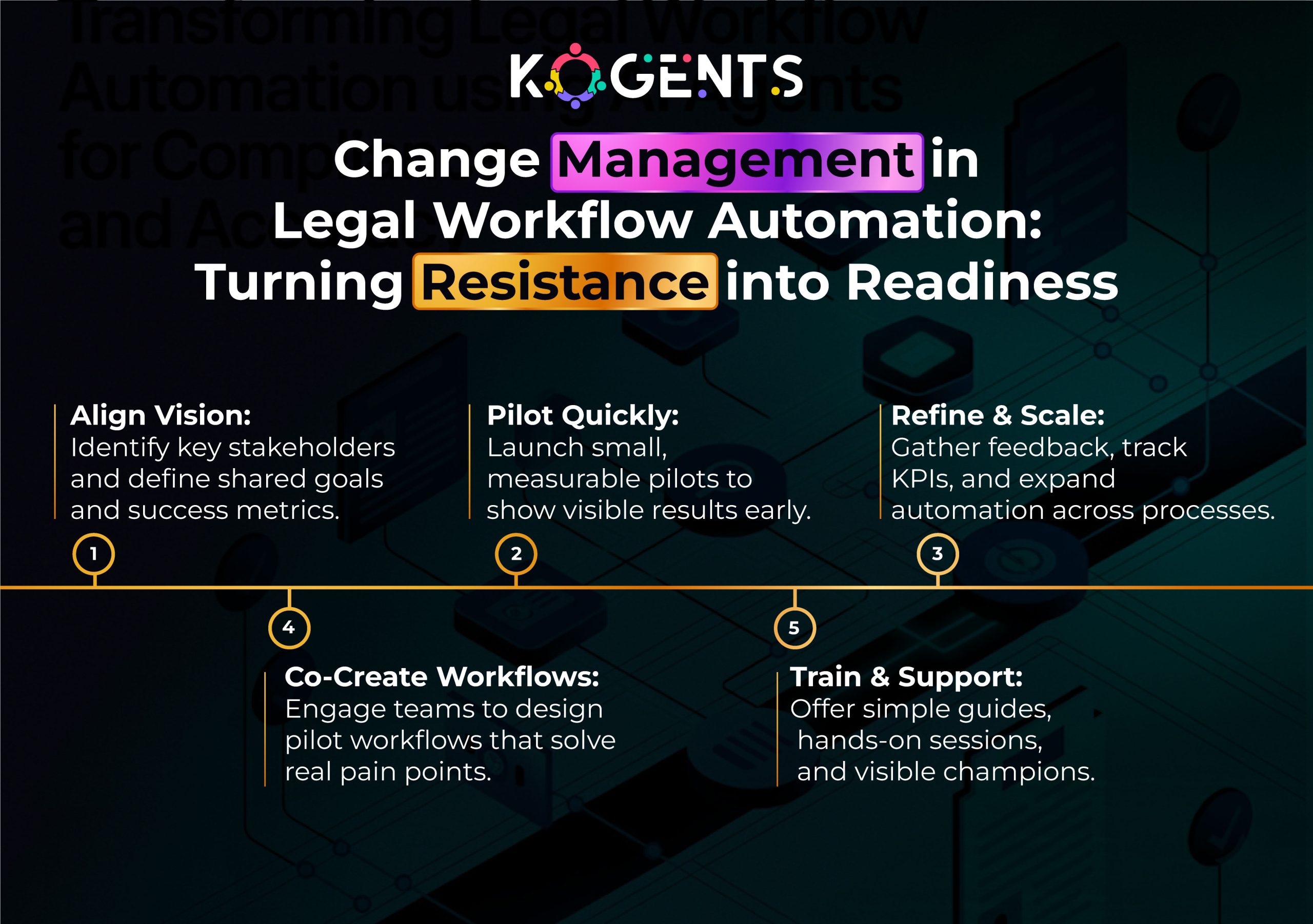
Change Management and Cultural Resistance
- One of the biggest impediments isn’t technology. It’s people.
- Legal professionals may resist automation, fearing job loss or quality decline.
- Ensuring adequate training, communication of benefits, and building trust is vital.
Vendor and Platform Selection
- Choosing a platform that is generic BPM rather than legal-workflow-centric will hamper adoption.
- Requirements around AI-agents, legal domain logic, and compliance controls must be explicit.
Data Privacy, Security & Jurisdictional Complexity
- Legal workflows often involve privileged and highly sensitive data.
- If the automation platform lacks strong encryption, RBAC, audit logs, and jurisdiction-specific logic (e.g., cross-border data flows, local regulations), the risk is elevated.
Over-automation & Loss of Human Oversight
- Automation may tempt teams to eliminate all human review, but for legal work, human judgment remains essential.
- AI agents may flag, but should not fully replace attorney review. Studies note the importance of human intervention to mitigate risk.
Final Insights!
In an era where legal teams are expected to do more with less, the move from repetitive manual work to intelligent, AI legal workflow automation is inevitable.
Success depends on defining clear requirements, integrating AI agents, and embedding compliance from the start.
We help legal teams design and scale automation platforms that boost efficiency, accuracy, and strategic impact.
If you’re ready to leave the bottlenecks behind and embrace a new era of legal operations, reach out at kogents.ai.
Let’s make compliance effortless, accuracy automatic, and legal strategy unbeatable.
FAQs
What is legal workflow automation?
Legal workflow automation refers to the use of technology—software, AI agents, workflow engine- to streamline repeatable legal tasks (e.g., contract generation, approval routing, matter intake) so they run with consistency, speed, and visibility.
How does legal workflow automation work in a law firm?
In a law-firm context, automation starts with mapping the process (e.g., client intake), then building a workflow engine: forms trigger tasks, tasks trigger approval routing, documents auto-generate, e-signature collects signatures, matter moves to the next stage. AI agents may review clauses or flag risks. Integration with case-management and billing systems ensures end-to-end flow.
What are the benefits of legal workflow automation for in-house legal teams?
For in-house teams: faster approvals, consistent compliance across business units, reduced risk of missed deadlines, less legal spend leakage, better visibility into legal operations, improved client stakeholder satisfaction.
Is legal workflow automation safe and compliant?
Yes, when built with proper legal workflow automation requirements: audit trails, RBAC, encryption, jurisdiction logic, and human-in-loop review. Leading vendors support ISO 27001, SOC 2 Type II, and legal data governance.
What tasks can be automated in a legal department?
Tasks ripe for automation include: client/matter intake, conflict checks, contract drafting (via templates), document review (AI-powered), approval routing, e-signature, obligation tracking, billing/invoicing, regulatory filings, and compliance workflows.
Legal workflow automation vs legal process automation – what’s the difference?
They overlap. Legal process automation refers broadly to automating any legal process. Legal workflow automation emphasises the step-by-step routing, approvals, tasks, and automation of the flow itself. In practice, the terms are often used interchangeably, but focusing on “workflow” highlights the orchestration of tasks rather than individual process automation.
How does AI support legal workflow automation?
AI agents support: document and clause analysis, risk flagging, forecasting delays or cost overruns, natural-language intake forms, smart routing based on expertise, anomaly detection in billing or spend.

Kogents AI builds intelligent agents for healthcare, education, and enterprises, delivering secure, scalable solutions that streamline workflows and boost efficiency.