How Slack Bot Automated Messages Save Teams Hundreds of Hours Every Quarter
Summary:
Imagine your team waking up on Monday to find that dozens, if not hundreds, of routine reminders, status updates, approvals, surveys, and check-ins have already been delivered, processed, or scheduled automatically.
No copy-pasting, no chasing people, no context-switching over email or chat. That’s the power of Slack Bot Automated Messages: bots embedded in the messaging fabric of your work platform, quietly taking care of recurring, low-value tasks, while your team focuses on what matters most.
In an era when every hour counts and business pressure to “do more with less” is at an all-time high, the right automation can turn wasted minutes into meaningful output.
This blog explores how “Slack bot automation for teams” can save hundreds of hours every quarter, why it matters, and how you can make it real for your organisation. So, delve in without wasting a second.
Key Takeaways
- Time Savings: Teams using Slack automation save an average of 3.5 hours per week per person.
- Compounding Impact: Automating reminders, approvals, and check-ins adds up to hundreds of hours saved each quarter.
- Seamless Integration: Slack bots fit into daily workflows, reducing context switching and boosting focus.
- Prove ROI: Track hours saved, tasks automated, and cycle times reduced to turn automation into a measurable business win.
- Govern Smartly: Avoid bot fatigue and duplicate alerts with clear governance and change management.
Why Teams Are Losing Time in 2025: The Productivity Gap?
In today’s hybrid-work world, teams juggle time zones, meetings, and repetitive tasks that drain focus.
The Role of Slack Bot Automated Messages in Modern Workflows
A Slack bot is any automated agent or script within the Slack platform (or integrated via API) that sends, responds to, or orchestrates messages without manual input each time. These messages might include:
- Recurring announcements or check-ins (e.g., weekly status stand-ups)
- Reminders (e.g., task due dates, approvals pending)
- Notifications triggered by other tools (e.g., Trello card moved, Salesforce deal stage changed)
- Scheduled messages (e.g., monthly survey, quarterly planning kickoff)
How Does Slack Bot Automation for Teams Works: Triggers, Workflows, Integrations?
A typical workflow looks like:
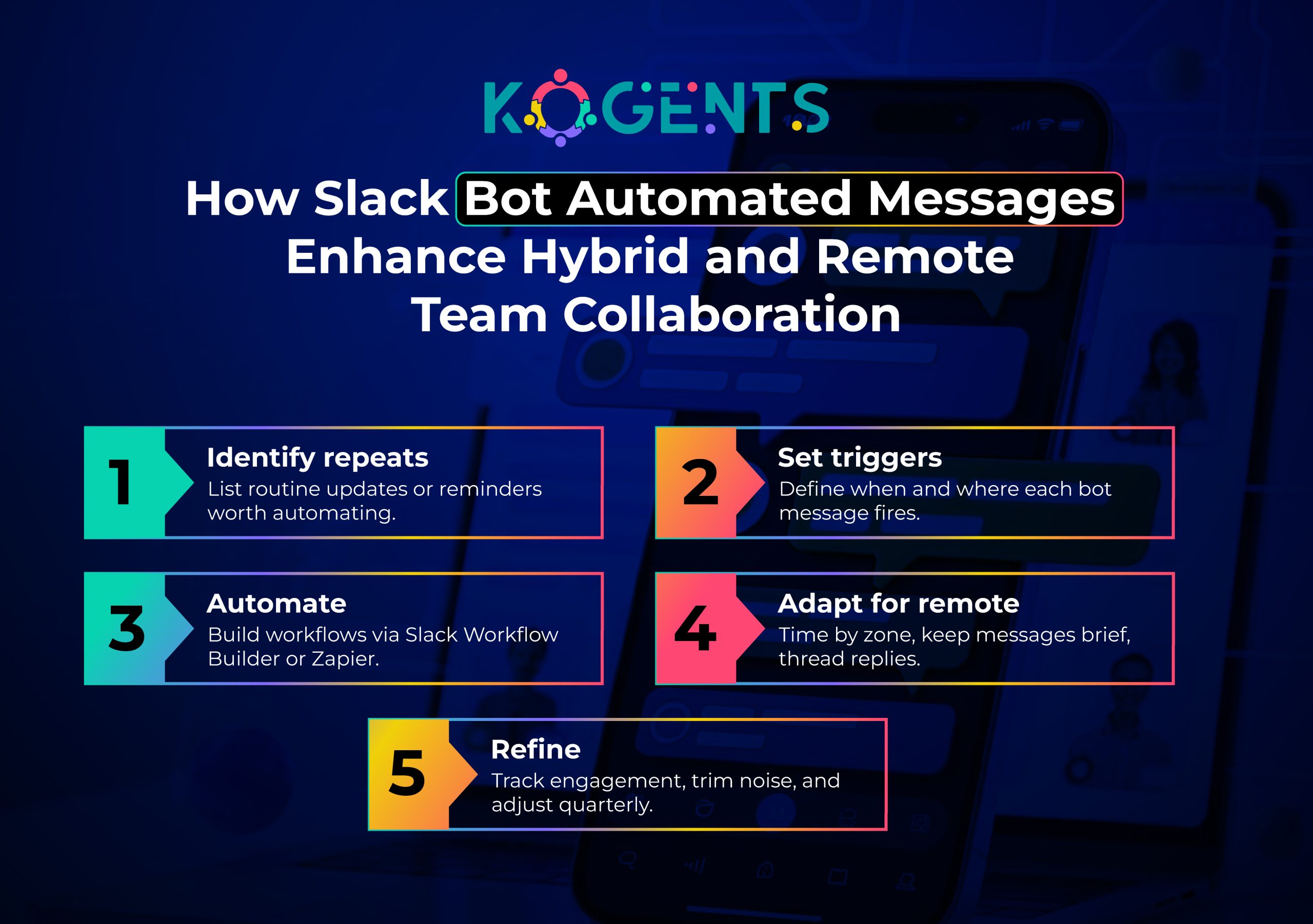
- Define a trigger (e.g., form submitted, task status changed, date/time reached)
- The bot sends a message into a Slack channel (or direct message) with the relevant content or action request.
- Optional follow-up actions record to a database, post a summary, create a ticket, schedule the next reminder
- Repeat automatically on schedule (daily, weekly, quarterly) or on an event-driven basis.
Key capabilities: message scheduling, reminders, recurring notifications, workflow automation
Let’s unpack some of the most used features:
- Message scheduling: A bot can post a weekly summary or reminder at 9 a.m. Monday in a channel, no humans needed.
- Reminders & notifications: For tasks due, approvals pending, and events approaching, the bot sends timely alerts.
- Recurring check-ins: Weekly, monthly, quarterly surveys or team-status updates are automatically triggered.
- Workflow automation/hand-offs: The bot triggers the next step when a task completes, opens a ticket, posts a summary, and routes to the next stakeholder.
- Integration with external tools: Slack bots connect with project tools (Trello, Jira), CRM (Salesforce), and HR systems (Workday) so that messages reflect real-time data.
Bonus Point: The magic is that “Slack bot saves team time” by automating the messages you used to send manually, freeing hours, reducing noise, and increasing reliability.
Quantifying the Time-Savings: Metrics, Statistics, and ROI
Industry Research and Data
According to Slack’s “Intelligent Automation” blog, 65% of the most productive employees are intelligently automating their workflows and saving an average of 3.5 hours per week.
In the “Workflow Automation” guide, Slack reported that people using automation at work save 3.6 hours per week.
Teams using AI daily in Slack claim they are 64% more productive and 81% more satisfied with their job.
Mapping to “Hundreds of Hours Every Quarter”
Let’s do the math:
- Suppose a team of 10 people each saves 3.5 hours per week via Slack bot automated messages. That’s 10 × 3.5 = 35 hours saved per week.
- Over a quarter (~13 weeks), that becomes 35 × 13 = 455 hours saved.
- Extend that to a team of 20 => ~910 hours per quarter.
Note: Hence, the claim of hundreds of hours every quarter is realistic when you scale even small weekly savings across teams.
Time-Savings Breakdown Table
| Team Size | Avg Hours Saved/week/person | Total Weekly Saving | Quarterly (13 weeks) Hours Saved | Equivalent Work-Weeks (40 h/week) |
| 5 people | 3.5 h | 17.5 h | 227.5 h | ~5.7 work-weeks |
| 10 people | 3.5 h | 35 h | 455 h | ~11.4 work-weeks |
| 20 people | 3.5 h | 70 h | 910 h | ~22.8 work-weeks |
| 50 people | 3.5 h | 175 h | 2,275 h | ~56.9 work-weeks |
ROI Considerations
When your team saves hundreds (or thousands) of hours every quarter, the business return is real: more time for high-value work, fewer manual errors, faster response times, improved morale.
As Slack states: The more repetitive tasks you can offload to automation, the greater your potential returns on investment (ROI).
Soft Reminder: Thus, implementing Slack bot workflow automation for teams becomes not just a “nice-to-have” but a strategic lever for organisational efficiency.
Use-Cases and Scenarios for Slack Message Automation for Teams
Here are some concrete ways teams can deploy Slack bot scheduling messages for the team, Slack bot for task reminders, and other such automation within Slack.
Onboarding and Off-boarding
Every new hire needs a set of standard tasks: account creation, tool access, training modules, welcome message.
A Slack bot can:
- Automatically send a welcome message to a #-new-hires channel
- Post a checklist reminder to the new hire weekly until completion
- Notify HR/IT if any item remains pending after a set threshold.
Task Reminders and Status Updates
For any team, recurring reminders help keep things moving:
- A bot posts in #dev-standup at 9 a.m. with “Please drop your three bullets.”
- A bot monitors Jira cards and posts in #ops-alerts when a ticket is overdue
- A sales team bot triggers a message when a deal reaches a stage, and asks for the next step input.
Key Point: With this, Slack bot message automation ROI emerges via fewer missed deadlines and less effort chasing updates.
Recurring Check-ins and Surveys
Whether weekly team pulse-checks or quarterly employee-engagement surveys:
- A bot sends survey links, reminds participants, and collates results
- A bot posts a summary of responses into the leadership channel
- Recurrence can be scheduled automatically (monthly, quarterly)
Resolve the Query: This tackles the repetitive “send the same message again” problem.
Integration with Project Tools (Trello, Jira, Salesforce)
Many teams live in multiple tools; bots help by:
- Watching for Trello card moves and posting updates in the Slack channel
- On Salesforce deal close: triggering a bot to post “Congrats! Please fill out the competitive-intelligence form.”
- For HR: when a form is submitted, the bot posts: “New request in #hr-helpdesk, please respond.
Hybrid Work Communication Automation
In a hybrid workplace, many teams lose time because of misalignment or missed messages. Bots help:
- Scheduled stand-up prompts for a distributed team.
- Automatic nudge when someone hasn’t responded in #project-update for 24 h.
- Recurring message in #announcements: “Reminder: submit your timesheet”
Case Studies: Real Teams Deploying Slack Bot Workflow Automation
Case Study 1: Slack’s Internal Story
According to the Slack blog,
Key highlights:
- The sales team got an “Approvals Bot for Deals,” which shortened deal-approval time.
- Metrics Bot delivered daily performance metrics via Slack AI agent integration, making data accessible at the point of work rather than buried in dashboards.
Result: Better speed, fewer emails, fewer waiting periods.
Case Study 2: Remote/Hybrid Team Gains
From Slack’s “Remote Work Management” blog, Remote workers save time with automation and use technology to get work done faster.
Key highlights:
- Remote/hybrid teams that implemented automation for notifications, check-ins, and communication via Slack reported improved alignment and fewer manual follow-ups.
Example: an automated check-in message in Slack for remote start of day helped teams sync and avoid wasted status-pinging.
Challenges and Pitfalls: What to Watch Out For!
Even though the benefits are clear, there are risks and pitfalls when rolling out Slack automation for recurring messages.
- Over-automation: When every message is automated, teams may feel less human connection or filter important alerts less, because balance is key.
- Poorly defined workflows: If the bot’s trigger logic is unclear, messages may be irrelevant or mistimed, reducing trust and usefulness.
- Integration complexity: Bots pulling from multiple tools require reliable APIs and maintenance; if one fails, the bot may send incorrect messages.
- Data-governance and trust: Automated messages may expose sensitive info, require proper permissions, and must align with organisational data policies.
- Adoption resistance: Some employees may fear that bots will replace their jobs or feel excluded. Address change management proactively.
- Measurement gap: Without tracking metrics, you won’t know if the AI automation platforms are delivering the claimed “hundreds of hours” savings, and the business case may suffer.
- Bot fatigue: As mentioned, too many messages or poor timing leads to ignored bots; your automation becomes noise.
Smart Teams Don’t Work More; They Automate More!
After reading the entire blog, you must have been stagnant on this point that automation isn’t optional; it’s strategic.
By using Slack bot automated messages, teams save hours weekly, cut context switching, and focus on meaningful work.
Multiply that across a quarter, and the gains are huge: sharper focus, higher morale, and smarter collaboration.
At Kogents.ai, we build custom productivity Slack bots, automating reminders, scheduling, and workflows that drive measurable ROI.
Ready to stop repeating tasks and start scaling impact? Let’s automate with AI agents at Kogents.ai.
FAQs
What is the difference between “automated messages in Slack” and a regular Slack bot?
A regular Slack bot may respond when you mention it (“@bot help me”) or perform tasks on demand. “Automated messages in Slack” refer specifically to scheduled or triggered messages sent by a bot without the user explicitly initiating each time.
Which team workflows are best suited for Slack bot workflow automation?
The best workflows are those that:
- Happen regularly (weekly, monthly, quarterly)
- Involve status updates or reminders
- Require minimal variation (i.e., same structure each time)
- Span tools or require someone to remember sending a message
Do teams need coding skills to set up Slack bot messages and automation?
Not necessarily. Slack provides no-/low-code options (such as Workflow Builder) that allow you to create automated workflows without deep programming. For more advanced integration (e.g., connecting CRM or custom APIs), you might need developer assistance. But many basic “Slack bot for task reminders” and “Slack automated notifications for team” scenarios can be handled by internal teams with minimal coding.
How should we measure the ROI of Slack bot automated messages?
You can measure ROI by tracking:
- Number of hours saved per week/month (via employee feedback or time-tracking)
- Number of repetitive messages automated (versus manual)
- Reduction in missed deadlines or follow-ups
- Improvement in response times or process cycle times
- Team satisfaction or reduction in manual work complaints
Will automating messages reduce team communication or engagement?
It can, if done poorly. Bots should replace mundane messages, not meaningful human interaction. If the bot sends generic blanket messages without value or too many alerts, people may feel disconnected. To avoid this: ensure bots add value, allow human override or acknowledgement, personalise channels, and ensure the messages are relevant to the audience. The goal is to save time without losing engagement.
How often should we review/refine our Slack bot workflows?
At least quarterly, ideally monthly in the early stages. Review usage metrics: Are messages being received? Are people engaging? Is there bot fatigue? Are triggers still relevant? Workflow changes as teams evolve, so automation should evolve too. Regular review ensures your “Slack bot automation messages” stay useful and don’t become stale or ignored.

Kogents AI builds intelligent agents for healthcare, education, and enterprises, delivering secure, scalable solutions that streamline workflows and boost efficiency.